Skip to content
Omega People

HR software · for companies of 5 to 500 people

HR software for small business, with your country’s rules built in

Leave, time and attendance, rotas, onboarding and expenses in one place, with the employment rules of your country already set up — for one price per company, not per employee.

  • No credit card required
  • Nothing is charged unless you add a card
  • From £35 a month per company, never per employee
  • First month free
  • No per-employee fees
  • Six countries built in
  • Cancel anytime

6 countries

with leave, public holiday and working-time rules built in

0 per-employee fees

inside your band, hiring doesn’t change the price

£35 a month

for a company of up to 25 employees, excluding tax

Step 1 of 5

Everyone clocks in from where they work

In the browser on their own phone, or on a tablet by the door. Nothing to install.

Step 2 of 5

Leave is requested where the balance is

People see what they have left and ask for the days. The balance moves when you approve, not at month end.

Step 3 of 5

One queue for everything that needs a yes

Leave, clock-in corrections, expenses, overtime and shift swaps arrive in the same place, oldest first.

Step 4 of 5

The timesheet closes on real numbers

Hours worked against the hours each contract says, with overtime and absences already sorted.

Step 5 of 5

Payroll gets a file it can import

Hours, absences and approved expenses, laid out for your payroll software. Payroll itself stays where it is today.

Who it’s for

HR for small businesses whose people aren’t all at a desk

For owners, office managers and HR teams in companies of 5 to 500 people — offices, shops, kitchens, workshops, depots and sites — in the UK, the US, Canada, Australia, New Zealand and Switzerland.

OfficesLeave and absence with balances that update themselves.
WorkshopsHours booked to the job, not just to the day.
KitchensRotas published with rest periods already checked.
ShopsSeveral sites, each with its own holiday calendar.
Sites and depotsA tablet by the door as the time clock.
HiringFrom candidate to new starter without retyping anything.
The back officeOne person runs HR, and it doesn’t take the whole day.

What’s inside

HR software for small business: 31 jobs you no longer do by hand

31 features, grouped by the question they answer. Each one is a screen in the product, not a line in a brochure.
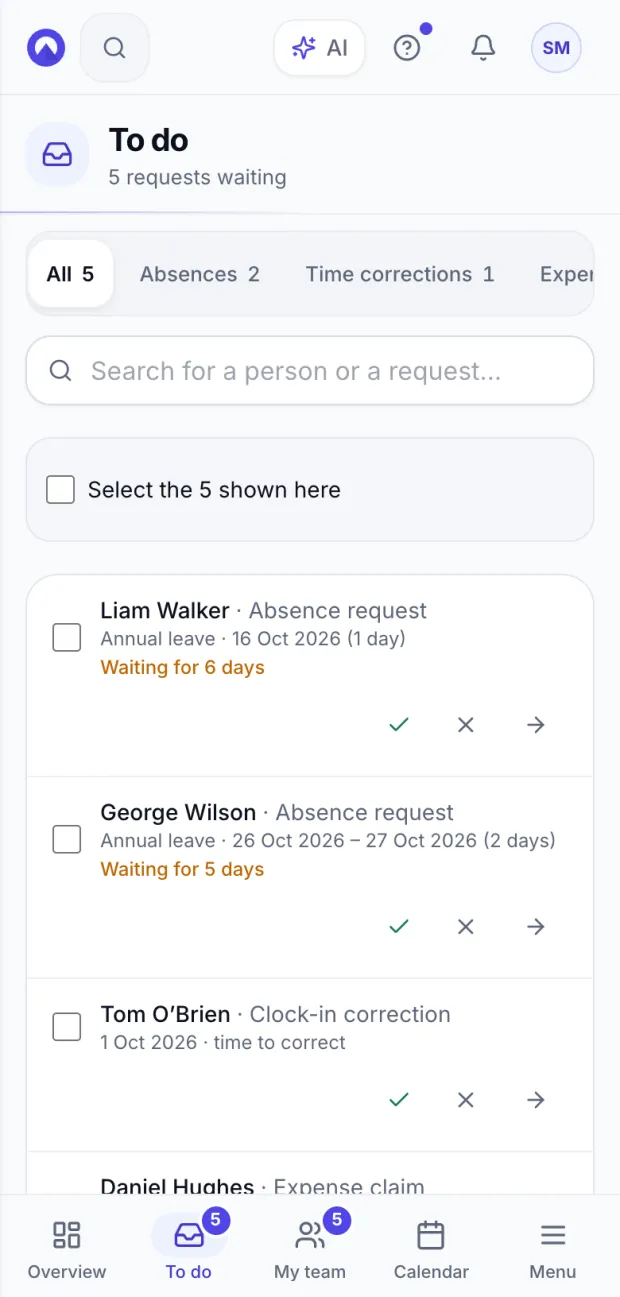
The To do list on a phone: leave requests, a clock-in correction and expense claims waiting, each with approve and decline buttons.
To do
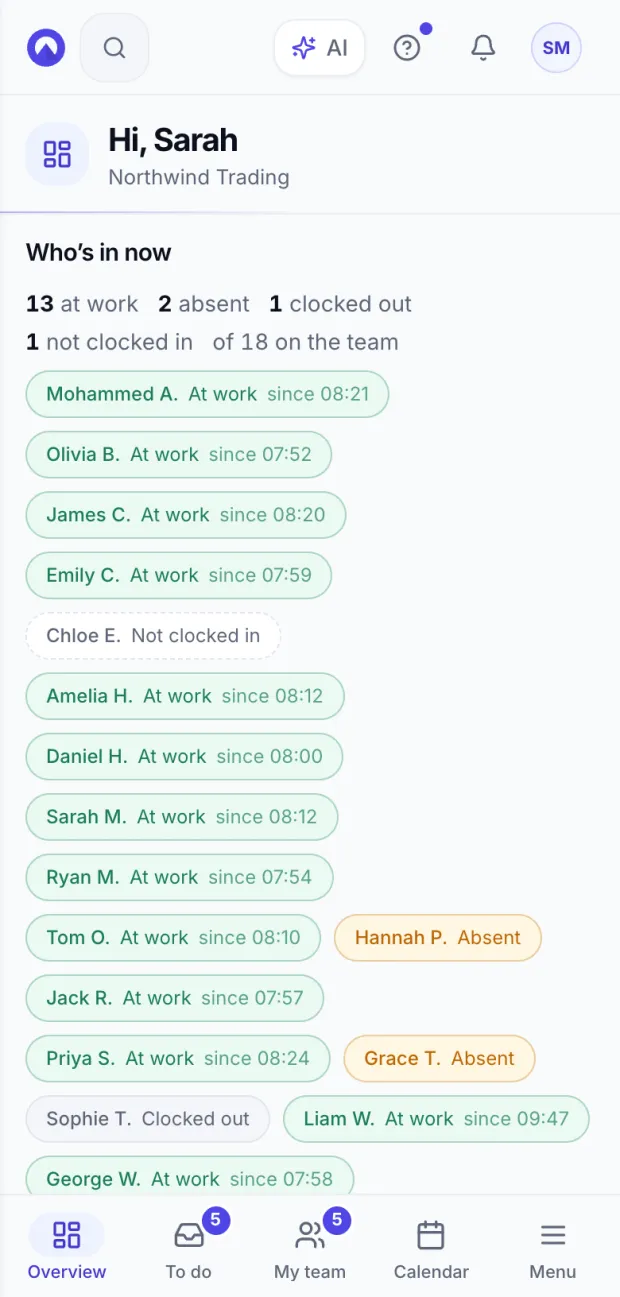
Who’s in now on a phone: how many people are at work, absent or not clocked in, and each person with the time they clocked in.
Who’s in now
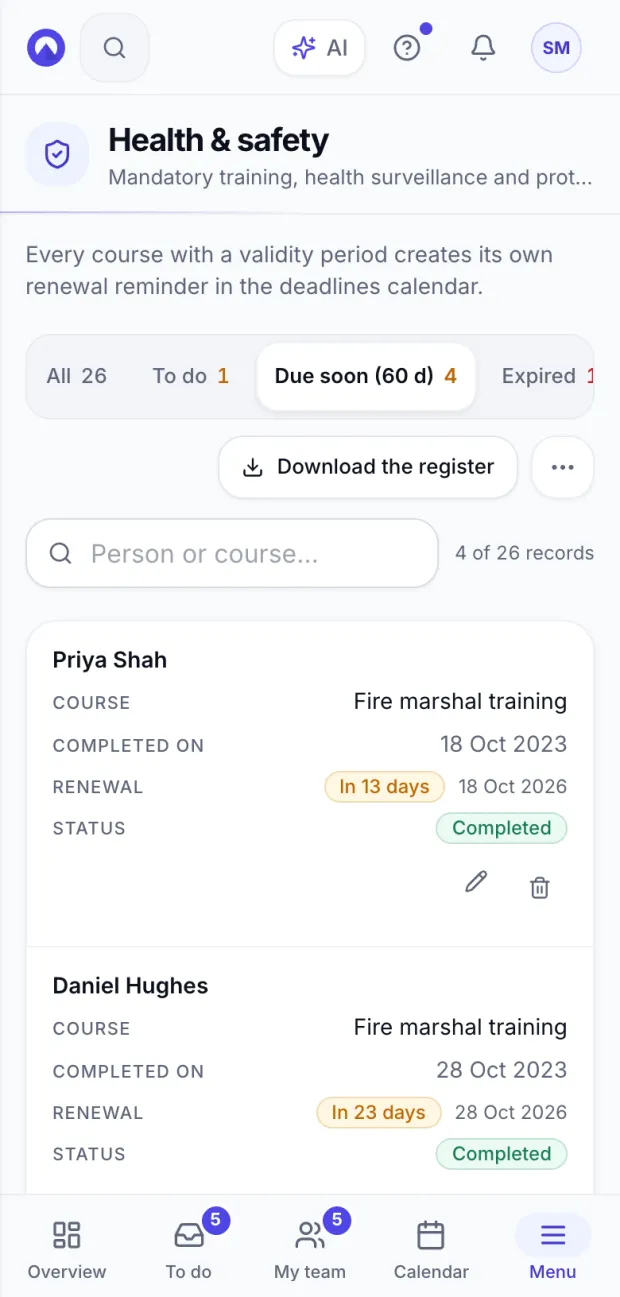
Health and safety on a phone: the training register filtered to the courses due for renewal in the coming weeks, with the days left for each.
Health & safety

Three of the 31, as they look on the phone of whoever runs HR: the approvals queue, who’s in right now, and the health and safety renewals coming up.

Time and attendance, leave management and rota planning

Attendance and absence without retyping anything: everyone clocks in and asks from their phone, you approve from one queue, and the month closes.

Leave and absence management

Requests, approvals and balances per leave type, with accrual, carry-over and a team calendar.

Public holidays by region

Every site follows the calendar of its nation, state, province, region or canton, plus your own company closure days.

Time and attendance

People clock in and out from the browser on their phone or at a tablet kiosk; timesheets, corrections and overtime follow from there.

4 more features in time, leave and rota

On-site kiosk

A tablet by the door becomes the time clock: badge code or badge QR, with an optional PIN, and printable badges.

Rota and shift planning

Build the week from templates, publish it, and let people swap shifts with approval.

Overtime and time in lieu

Daily and weekly thresholds from your country’s rules, optional approval, and a time bank for hours taken back as time off.

Hours by project

Hours booked to a project or client, so you know what a job really takes.

Country rules, health and safety, and the deadlines that come round

The things you’re asked for when something happens, with their dates inside — and the employment rules of six countries, last reviewed on 5 October 2026.

Country rules built in

Leave types and statutory minimums, working-time limits, sick-leave rules and checklists for the UK, the US, Canada, Australia, New Zealand and Switzerland.

Deadlines and compliance

A calendar of statutory filing dates for your country, plus contract ends, training renewals and expiring documents.

Health and safety

Mandatory training with expiry dates, medical checks, PPE issued and an incident and near-miss register.

2 more features in compliance

Speak-up channel

A confidential page for reporting wrongdoing, anonymous if the person chooses, with a code to follow the case.

Equipment and assets

Who has the laptop, the phone, the van and the access card, with a signed handover and a return date.

What’s built in for each of the six countries

United Kingdom

28 days’ statutory annual leave (5.6 weeks), with the bank holidays of each of the 4 nations

The 48-hour average week with opt-out, daily and weekly rest, and Statutory Sick Pay rules

A 13-step onboarding checklist, from the right to work check to pension auto-enrolment

United States

No statutory paid vacation, so PTO follows your policy; federal and state holidays for 50 states and DC

Overtime over 40 hours a week at 1.5× (FLSA), with state rules and state paid sick leave laws noted

A 12-step onboarding checklist with Form I-9, Form W-4 and the state new-hire report

Canada

2 weeks’ vacation after a year, more in some provinces; statutory holidays for 13 provinces and territories

Overtime over 40 hours at 1.5× federally, with provincial thresholds and sick-leave rules

A 9-step onboarding checklist with the SIN, TD1 forms and Québec’s TP-1015.3-V

Australia

4 weeks’ annual leave and 10 days’ personal/carer’s leave under the NES

38 ordinary hours a week, public holidays for 8 states and territories, long service leave by state

An 11-step onboarding checklist with the Fair Work Information Statement, TFN declaration and super choice

New Zealand

4 weeks’ annual holidays and 10 days’ sick leave under the Holidays Act 2003

Public holidays with the anniversary day of each of the 17 regions, and alternative holidays

A 9-step onboarding checklist with the employment agreement, IR330 and KiwiSaver

Switzerland

20 days’ holiday (4 weeks, 5 for under-20s) and the public holidays of all 26 cantons

The 45-hour maximum week, overtime at 1.25× and continued pay during illness (CO art. 324a)

A 10-step onboarding checklist with AHV, BVG, UVG and withholding-tax registrations

Last reviewed on 5 October 2026. The rules are a starting point and you can change every value: your contracts, awards and collective agreements may set different terms. This is not legal advice.

Payroll preparation: hours, expenses and payslips

Payroll stays with whoever runs it today. We prepare the month, check it and produce the file their software imports.

Expenses and mileage

A photo of the receipt, mileage at your country’s approved rate, limits by category, and approval before anything is reimbursed.

Business trips

Authorisation before the trip, advances, daily allowances and the trip account afterwards.

Payroll preparation

The month’s hours, overtime, absences and approved expenses per employee, exported in a file laid out for your payroll software.

1 more features in payroll preparation

Payslips to each employee

Upload the payslip PDF from your payroll provider: it is split and matched to employees, and each person finds their own.

Payroll export layouts, country by country
  • United Kingdom: Sage 50 Payroll, Xero Payroll UK, BrightPay and QuickBooks Payroll UK, or a plain CSV
  • United States: Gusto, ADP Workforce Now, RUN Powered by ADP, Paychex Flex, QuickBooks Payroll and Rippling, or a plain CSV
  • Canada: Wagepoint, ADP Canada (Workforce Now), Dayforce (Ceridian), QuickBooks Online Payroll (Canada) and Payworks, or a plain CSV
  • Australia: Xero Payroll AU, MYOB Business / AccountRight, Employment Hero Payroll (KeyPay) and QuickBooks Online Payroll AU, or a plain CSV
  • New Zealand: Xero Payroll NZ, MYOB IMS Payroll / PayGlobal, Thankyou Payroll and Smartly, or a plain CSV
  • Switzerland: Abacus AbaLohn, bexio Lohn and Sage 200 Lohn CH, or a plain CSV

Product names belong to their owners and are listed only to say which file layouts exist. Omega People is not affiliated with these vendors.

Your people: hiring, org chart, reviews and reports

Who joins, who reports to whom, how each team is doing, what a department costs and who can see what.

Employee records

One profile per person: contract, job title, department, site, manager, pay, documents and history, with the ID and bank formats of your country.

Org chart, departments and sites

Who reports to whom, by department, site and cost centre.

Hiring and careers page

Job openings on a public careers page with an application form, and a candidate pipeline from application to offer.

12 more features in people and reporting

Employee onboarding

New starters enter their own details through a personal link, and each one gets your country’s checklist with an owner and a due day for every step.

Documents and e-signature

Contracts and policies from templates, sent to one person or to everyone, signed electronically with a certificate added to the PDF.

Announcements

Company news to everyone or to chosen teams, with a record of who has read it.

Performance reviews and goals

Review cycles with a self-assessment and a manager review, and goals each person updates during the year.

Engagement surveys

Pulse surveys with eNPS, anonymous, with results shown only once enough people have answered.

Training

A course catalogue, a training plan, sessions with attendance, and requests from employees against a budget.

To do queue

Everything waiting for a decision — leave, corrections, expenses, overtime, shift swaps, new hires — in one list, oldest first.

Reports

Headcount, absence rate, staff turnover, estimated labour cost and a gender pay gap view, with CSV download.

Automation rules

Reminders that send themselves: a request left waiting, a probation period ending, a deadline coming up, a work anniversary.

Roles and permissions

Decide who can view or manage each module, limit managers to their team, and keep an audit log of changes.

Import and export

Bring in your employees from Excel or CSV, with a dry run first.

Several companies, one login

Run more than one company from the same account, each with its own people and its own country.

See it working

Watch it before you try it

These clips are Omega People itself, recorded on a sample company in your language — not mock-ups, not slides. And every screen works in full on a phone: not a cut-down version, the same software.

PeopleAdding an employee
Time and attendanceClock-ins and the timesheet
Leave and absenceLeave requests and the team calendar
Payroll preparationPreparing the month for payroll
  • Recorded on the real productWhat you see is the software you’ll sign in to, with a sample company’s data. Nothing is drawn for this page.
  • In English, German and FrenchEach person picks their own language; dates, numbers and currency follow your company’s country.
  • The whole product on a phonePeople clock in, ask for leave and open their payslips in the browser on their own phone; managers approve from the same queue.
  • The Omega People appThe Omega People app for iPhone and Android is being published on the App Store and Google Play right now. Until it’s there, the phone’s browser does everything.

Pricing

HR software pricing per company, not per employee

One price per company, in bands by headcount: inside your band, hiring doesn’t change the bill. Every module is in every band. Prices are in your local currency, excluding tax. First month free, no credit card required — and pay yearly to get 2 months free.

Prices for

up to 25 employees

£35a month, excluding tax

  • No per-person fees: within your band, hiring does not change the price
  • Employee self-service in the browser, on any phone, included for every employee at no cost per head
  • No per-user charge for the people who manage: as many HR admins and managers as you need
  • Updates and new features included
  • Import the spreadsheet you already have: column headings are recognised automatically
  • No long-term commitment: cancel whenever you like, without notice or penalties, and export your data in a file
Try it free for 30 days

The bands

Up to 25 employees£35 a month
Up to 75 employees£69 a month
Up to 200 employees£119 a month
Up to 500 employees£179 a month
Over 500 employeesby quote

Instead of

Estimate for a company of 25 employees, based on the lowest public list price we found for a full HR suite with time and attendance in your market. Per-employee platforms grow with every hire; here the price only changes when you move up a band. Estimate reviewed in October 2026.

an HR platform with time and attendance, sold per employee: 25 employees at about £4.40 each£110
Today, every month£110
Here, for the same company£35

Tailor-made

Need something that isn’t here? We can build it

Omega People can be adapted to the way your company works: a report your board asks for, an export layout for a payroll product we don’t list, a module that doesn’t exist yet. It isn’t included in the standard price — we quote for it separately, as a one-off project or a dedicated subscription, once we’ve looked at what you really need.

Email us for a quote

amministrazione@outlinedigital.it

Questions

What HR managers ask us before they try it

What is Omega People?
It’s cloud HR software for small and mid-sized businesses: employee records, leave and absence, time and attendance, rota and shift planning, onboarding, documents with e-signature, expenses, performance reviews, training and health and safety records. It runs in the browser on a computer, tablet or phone, with nothing to install, and it comes with the employment rules of the UK, the US, Canada, Australia, New Zealand and Switzerland already set up.
Does Omega People run payroll?
No. It does not calculate tax, pension or social-security contributions, does not produce payslips and files nothing with the tax authority. It prepares the month — hours, overtime, absences and approved expenses per employee — and exports a file laid out for your payroll software, accountant or bureau. When payroll is done, you can upload the payslip PDFs and each employee finds their own.
Are the employment rules for my country included?
Yes, for six countries: the United Kingdom, the United States, Canada, Australia, New Zealand and Switzerland. You choose the country when you create the company and start with its leave types and statutory minimums, public holidays by nation, state, province, region or canton, working-time limits, sick-leave rules, onboarding and offboarding checklists and a calendar of statutory deadlines. The rules are reviewed against official sources and the review date is shown on this page. They are a starting point you can edit, not legal advice.
How do employees clock in? Is there a mobile app?
The Omega People app for iPhone and Android is being published on the App Store and Google Play right now; until it is there, everything works in the browser. Employees clock in and out from the browser on their own phone or computer, from a personal link that needs no account, or at a tablet by the entrance set up as a kiosk, using a badge code or the QR code on their badge. Clocking in from the browser records the time, not the location.
Why is it priced per company rather than per employee?
Because a per-employee price makes every new hire a software decision. Here there’s one price for the company, in bands by headcount: up to 25 employees for £35 a month, up to 75 for £69, with every module in every band and no charge for the managers and HR admins who run it. Inside your band, hiring doesn’t change the bill.
Can I import my employees from a spreadsheet?
Yes. Upload a CSV or Excel (.xlsx) file and the column headings are recognised automatically: names, contact details, job title, department, site, manager, contract type, hours, start date, salary and the opening annual-leave balance. You see a dry run with any problems before anything is saved, and an import can be undone. Attendance history, shifts and documents are not imported.
How do leave balances work?
Each leave type has its own entitlement, which accrues monthly or is granted at the start of the year, pro rata for part-timers. You set how much can be carried over and when it expires. When a request is approved the balance updates at once, and employees see what they have left before they ask. Public holidays for the site’s region are never counted as leave.
Where is my data stored?
On servers in Germany, in the European Union, with a backup every day. How employee data is processed is set out in the data processing agreement and the security page in our legal documents.
What happens if I stop paying?
The company becomes read-only: you and your team can still open everything and export your data for 30 days. After that the data is deleted. You can cancel whenever you like, without notice or penalties, and there is a 30-day money-back guarantee from your first payment.

Get started

Set up your company, invite your people, close your first month

First month free, no credit card required. Import the spreadsheet you already have, and if it isn’t right for you, you don’t pay a thing.